
YouTube is a treasure trove of video content, offering a vast collection of entertaining and informative videos. However, not all videos are available to download, and some of them require a YouTube Premium membership. But don't worry, there are free YouTube to MP4 converter tools. In this guide, we will introduce a versatile tool to help you convert YouTube to MP4 for free and save 1080P, 2K, 4K, or 8K quality. Let's dig in.
Content
Part 1: What is MP4
MPEG-4 Part 14 or MP4 is a digital multimedia container format most commonly used to store video and audio, but it can also be used to store other data such as subtitles and still images. Like most modern container formats, it allows streaming over the Internet. The MP4 format offers several advantages, including:
Wide Compatibility: MP4 is highly compatible across various devices, platforms, software, and hardware media players.
Efficient Compression: MP4 utilizes advanced video and audio compression techniques, such as H.264 for video and AAC for audio. These codecs provide high-quality compression, resulting in smaller file sizes without significant loss in visual and audio fidelity.
Flexible Multimedia Support: MP4 can handle multiple types of multimedia content. It supports not only video and audio but also subtitles, images, and even 3D graphics, allowing for the creation of interactive and immersive multimedia experiences.
Metadata and Chapter Support: MP4 supports the embedding of metadata, such as title, artist, album, and copyright information, enabling easier organization and management of media libraries. Additionally, MP4 supports chapter markers, allowing users to navigate through long videos more efficiently.
Part 2: How to Convert YouTube to MP4 1080P for Free
TunePat VideoGo All-In-One offers the best way to convert YouTube to MP4 with high quality, fast speed, and batch download. It is a free YouTube to MP4 converter for computers. It helps you effortlessly download YouTube to MP4 format on computers, so that you can watch YouTube videos offline and transfer the videos to other devices.
TunePat is a great helper for saving high-resolution downloads. It can preserve 1080P, 2K, 4K, and 8K, ensuring that you enjoy your videos in the best possible quality. Your downloading is improved efficiently and conveniently with fast speed and batch download. TunePat has a powerful processor, which can download YouTube videos at 10x faster speed. If you are downloading a YouTube playlist, you can use the batch download feature to download all the titles inside in one click, greatly saving your time and effort.
What's more, TunePat offers an all-in-one video downloader. Apart from YouTube, it allows you to download videos from Netflix, Amazon Prime Video, HBO Max, and more than 1,000 websites. Any video can be downloaded in MP4 with high quality.

TunePat VideoGo All-In-One
- Download movies and shows from Netflix, Amazon Video, Disney+, and other streaming services in batches.
- Free download videos from YouTube, Vimeo, etc.
- Preserve HD videos in MP4/MKV format at high speed.
- Retain multilingual subtitles and audio tracks (including 5.1 audio).
- Select video quality, audio tracks, and subtitles as you wish.
- Get permanent offline playback for movies and shows at any time.
Step 1 Open YouTube Portal on TunePat
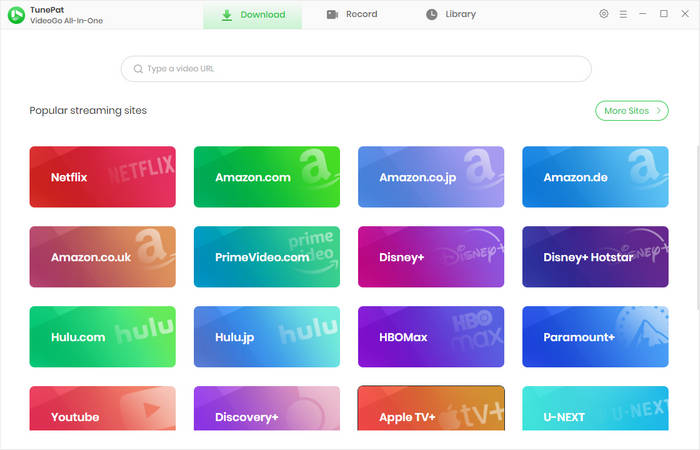
Start TunePat VideoGo All-In-One on your computer, and click on the YouTube portal. You will then see the built-in YouTube web browser. Log in to your account if needed; both the free and premium accounts are accessible.
Step 2 Select MP4 as Output Format
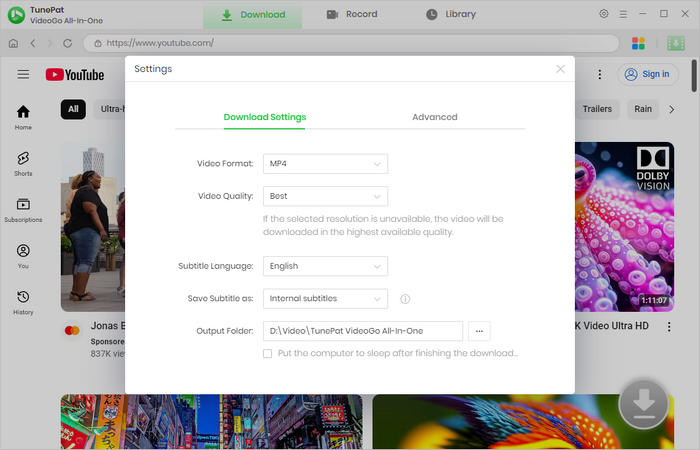
Click the gear icon "Settings" to open a window. Then choose MP4 as the output format. To save the highest video quality from YouTube, choose "Best". Make other settings as you like.
Step 3 Add YouTube Videos to Download
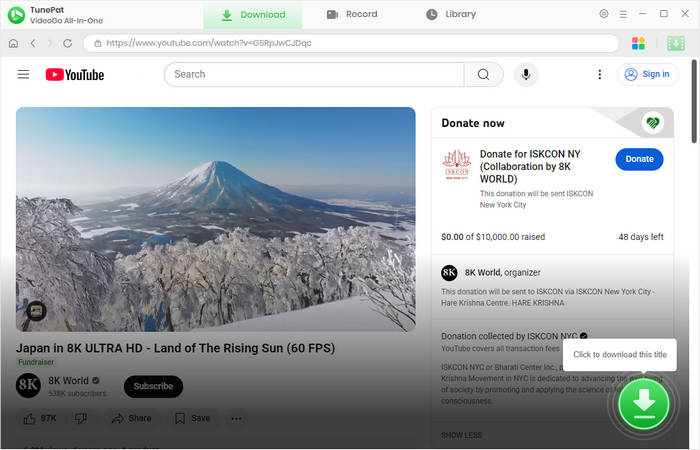
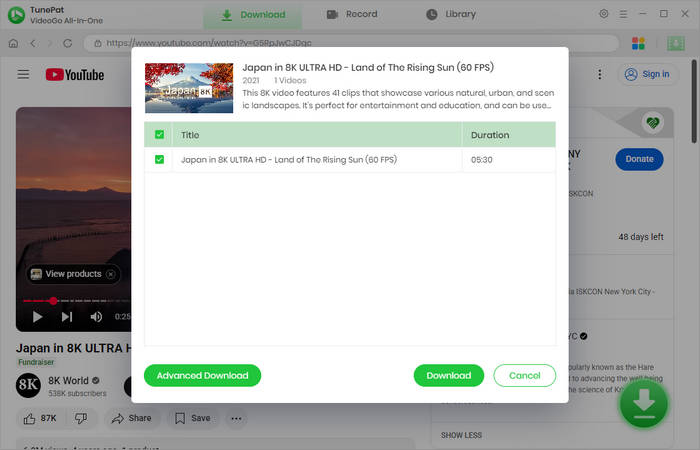
Browse the web browser and open the YouTube video you would like to download. Click the green arrow in the bottom right to parse the video. If there are multiple videos under this title, you are allowed to choose specific videos first.
Step 4 Convert YouTube Video to MP4 1080P
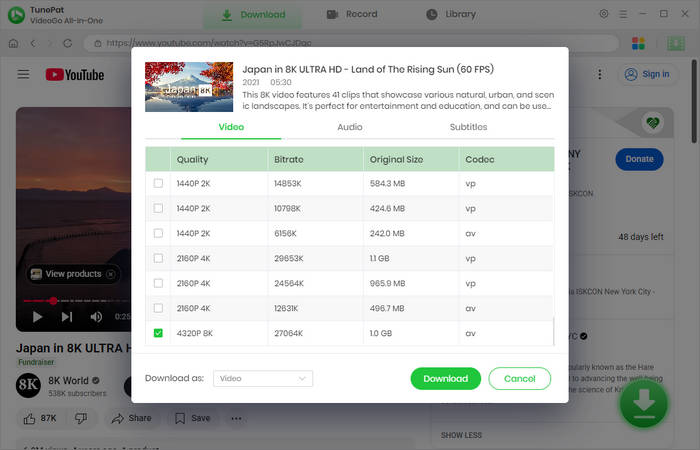
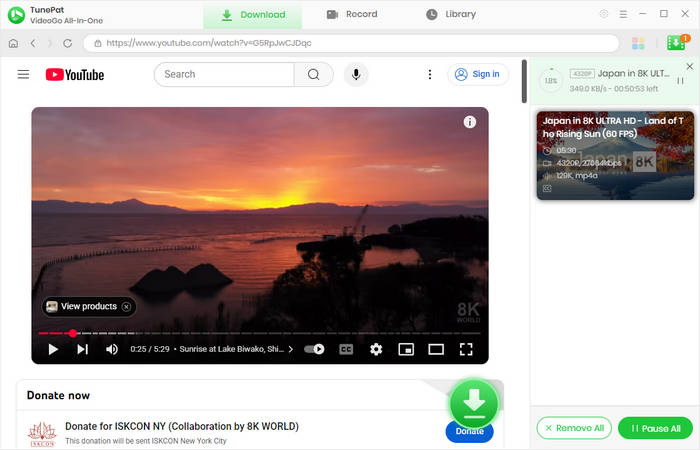
On the "Advanced Download" panel, you can choose specific video quality, audio tracks, and subtitles (if available). Then click "Download" to start converting YouTube video to MP4 format. During the conversion, the quality and audio tracks are fully saved.
Step 5 Watch YouTube Videos Offline
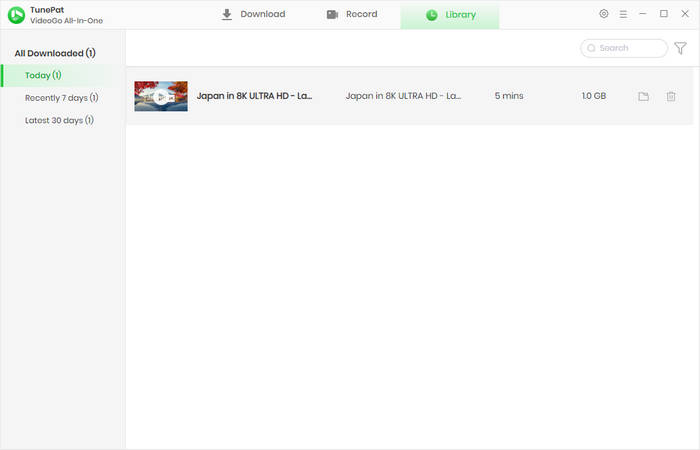
Wait patiently for the download. When it is complete, you can find the downloaded videos in the output folder. To check your download history, click "Library".
Part 3: FAQs about YouTube to MP4
How to download YouTube to MP4 4K?
To download YouTube to MP4 with 4K quality, you can use TunePat VideoGo All-In-One. It offers you a handy and free YouTube to MP4 converter. You are allowed to download YouTube videos to MP4 or MKV and save them in 1080P, 2K, 4K, or 8K (depending on the original quality).
How to download YouTube video playlist?
Using a YouTube video downloader is necessary to download YouTube video playlists. You can download videos from YouTube on your computer. If you would like to download YouTube video playlists in batches, you can use TunePat VideoGo All-In-One, which offers a fast and effective way to save YouTube video playlists.
Can I download video on YouTube?
Yes. YouTube offers a download button and allows you to save the videos for watching later. However, using the feature requires you to have a Premium subscription and allows up to 1080P quality only. To download YouTube video in MP4 for free, it's better to utilize TunePat VideoGo All-In-One. With TunePat, you can easily download MP4 videos from YouTube and save up to 8K quality. More importantly, you don't have to upgrade to YouTube Premium or pay, meaning you can download YouTube videos in MP4 for free.
Conclusion
TunePat VideoGo All-In-One is a versatile and powerful YouTube to MP4 converter. It simplifies the process of downloading videos from YouTube. With its ability to download videos in MP4 format while retaining high-resolution video, TunePat VideoGo All-In-One provides a comprehensive solution for YouTube video enthusiasts. By following the step-by-step guide outlined in this article, you can effortlessly download your favorite YouTube videos in MP4 format and enjoy them offline on any device. Download TunePat VideoGo All-In-One and save YouTube to MP4 for free now.








Izzy Warren
Content Writer