
Does Tubi allow downloads? Tubi is the most popular go-to free website to watch movies and shows online. Without any registration, subscription, or payment, you can watch unlimited videos for free. Unfortunately, you cannot download movies on Tubi directly. There is no download feature on the Tubi TV website or app. But don't worry. There are Tubi TV downloader available. This article provides you with the best 5 free Tubi downloader, including apps, browser extensions, and online tools. Feel free to download movies from Tubi TV now.

Contents
Part 1: 5 Free Tubi Downloader App, Extension, Online
In this part, we will show you the best 5 free Tubi downloaders. Whether you prefer an app, a browser extension, or an online Tubi video downloader, you get answers here. By using the Tubi TV downloaders, you can download unlimited movies and shows from Tubi for offline watching.
TunePat VideoGo All-In-One — Best Tubi Downloader
TunePat VideoGo All-In-One is the best Tubi downloader with its fast speed, HD download, and absolute safety. TunePat is a totally free Tubi downloader app for PC and Mac. You are not required to register, subscribe, or pay a penny; you can download videos from Tubi TV. There is no download cap, so you can download as many as you want. No matter it is a movie or a series, TunePat downloads them to your computer, allowing you to watch Tubi content offline at any time.
TunePat helps you effortlessly download Tubi in MP4 with HD quality. No matter which kind of video it is, you can download it in standard MP4 format and play it with any compatible media player or device. You don't need to worry about the quality, since TunePat supports saving 720p and 1080p completely. Moreover, unlike some tools that download video and audio separately, TunePat can download Tubi videos with audio perfectly in one click.
In addition, TunePat ensures you can download Tubi movies safely. It contains no ads, popups, redirections, or malware, doing no harm to your security and device. When you use TunePat, you just download videos, doing only one thing without interruption or distraction.
Apart from Tubi TV, TunePat enables you to download videos from over 1,000 websites. The supported sites include Netflix, Amazon Prime Video, Disney+, HBO Max, Apple TV+, Bilibili, TikTok, and OnlyFans. It is a true all-in-one video downloader.

TunePat VideoGo All-In-One
- Download Tubi videos to PC and Mac for offline watching.
- Preserve Tubi videos in MP4/MKV with HD quality at high speed.
- Download movies and shows from Netflix, Amazon Video, Disney+, and 1K+ streaming services in batches.
- Retain multilingual subtitles and audio tracks (including 5.1 audio).
- Select video quality, audio tracks, and subtitles as you wish.
- Get permanent offline playback for movies and shows at any time.
How to Download Tubi Movies for Free with TunePat
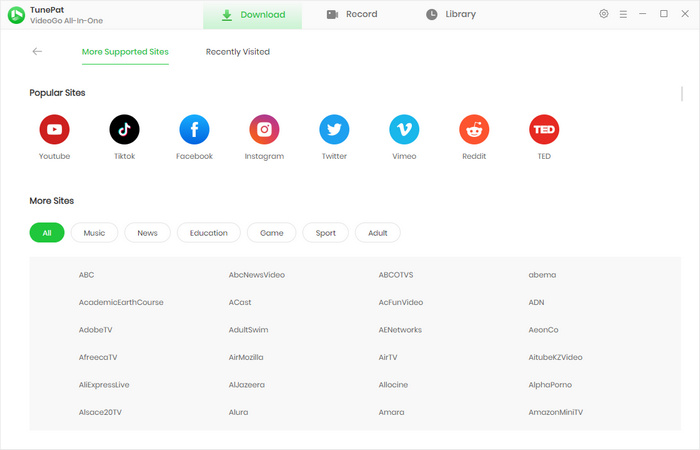
Step 1 Download, install, and run TunePat on your computer. Click "More Sites" on the primary screen and scroll down to find Tubi TV. Click it, and the embedded web browser will open, accessing https://tubitv.com/.
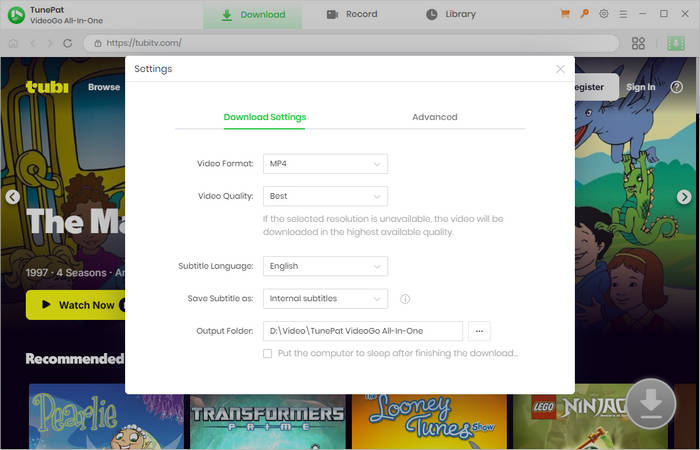
Step 2 Click the gear icon "Settings" on the top right corner. A window will open, where you can choose an output format and output path, and preselect video quality and more.
Step 3 Browse the web browser to find your favorite Tubi movies or shows. Click to open it. Then click the green arrow to parse the video.

Step 4 TunePat will then show you more download options. You are free to choose a video quality with different bit rates and file sizes according to your needs.
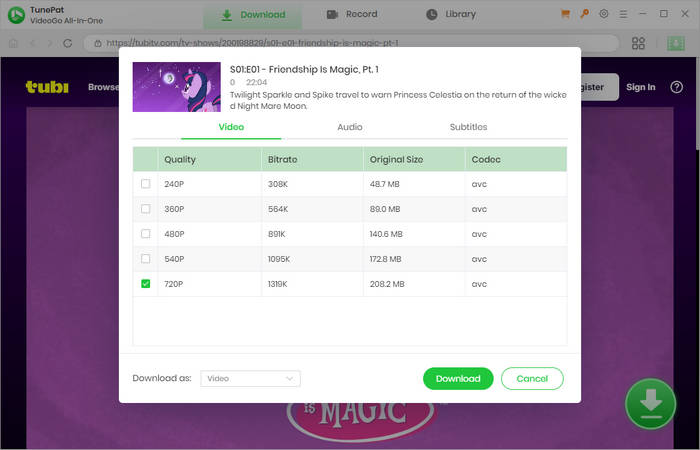
Step 5 Click the "Download" button to start Tubi video download on MacBook or your PC. TunePat has a powerful processor, making it possible to download an episode or movie within minutes. You can see the download process in the right bar. If you have multiple videos to download, repeat the previous steps and add them to the task list. TunePat will download Tubi videos one by one.
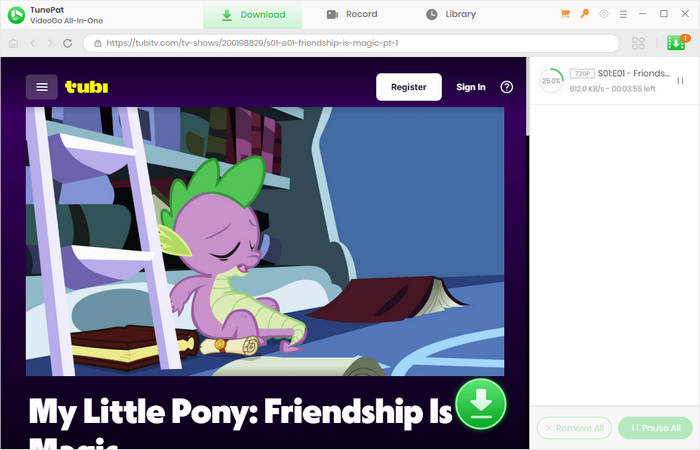
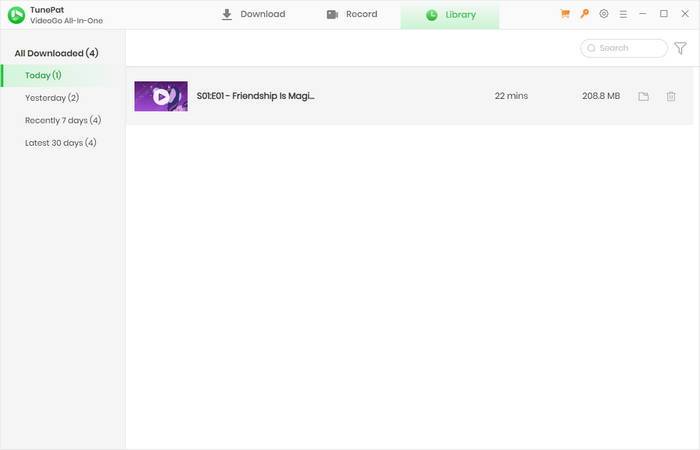
Step 6 When it is complete, you can find your download history in the "Library" tab. Open the output folder, you can check the downloaded video files, and then watch Tubi movies offline.
Pros
- Free to download movies and series from Tubi TV to computers.
- Save Tubi videos in MP4 with sound and HD quality.
- Fast download speed.
- No download limit.
- No ads, popups, or redirections, 100% safe and clean.
- Support downloading videos from 1K+ websites.
Cons
- Require users to install the app.
- Compatible with Windows and Mac only.
Any Video Converter — Tubi TV Downloader in MP4 HD
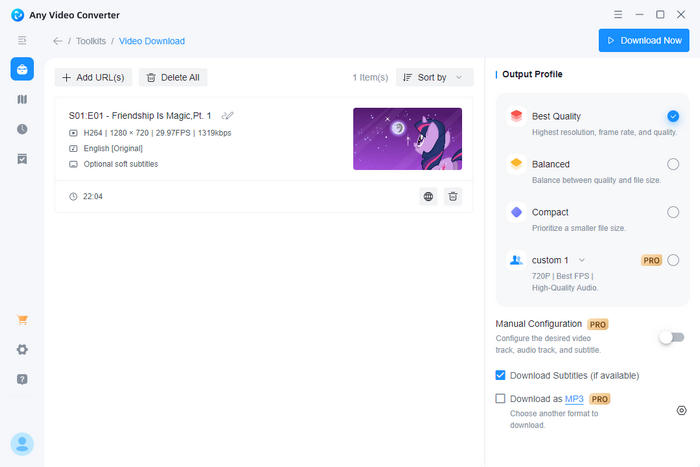
Any Video Converter (AVC) enables you to download from Tubi effortlessly. You can download Tubi movies and shows on your Windows and Mac computer. It helps you easily download Tubi movies in MP4 with HD quality (up to 720p). You can then watch them offline or transfer the videos to other devices. Similar to TunePat, this Tubi video downloader has a fast download speed, greatly saving you time and effort.
As you expected, AVC is free to download Tubi without limit. No registration, no sign-up, no subscription, and no payment. All you need to do is copy video links from Tubi TV and click the download button. AVC has a smart detection, which can read your clipboard intelligently and automatically parse URLs, reducing operation steps and making Tubi download convenient.
If you are looking for a video editor at the same time, Any Video Converter is your best option. Designed to be a comprehensive video tool, AVC has video download be a part of its features. With the program, you can also convert video format, compress video, add a watermark, extract audio, and do more than you can imagine.
Pros
- Free to download Tubi movies and shows.
- Download Tubi videos in MP4 with 720p.
- Fast download speed.
- Intelligently read video links on your clipboard.
- Safe and clean, with no ads and no redirections.
Cons
- Require users to download and install the app on PC or Mac.
How to Download Movies on Tubi with Any Video Converter
- Run Any Video Converter on your computer and select the "Video Download" portion on the home screen.
- Visit the Tubi TV website and copy the link of your favorite video.
- AVC will read and parse the link automatically. If not, click "+ Add URL(s)", paste the link, and click the "Analyze" button.
- Choose an output profile according to your needs. Click the gear icon if you want to customize more settings.
- Click "Download Now" to start Tubi TV video download.
Note: Any Video Converter downloads Tubi videos as MP4 by default. You need to upgrade to the paid version if you wish to customize download settings.
SaveTheVideo — Online Tubi TV Downloader
If you prefer to download Tubi TV movies online, you are in the right place. SaveTheVideo is a handy online Tubi downloader that allows you to download from Tubi. By using SaveTheVideo, you can download movies from Tubi on Android, iPhone, PC, Mac, and any device with a web browser. You can also download Tubi videos in MP4 format and watch them without an Internet connection. It sets no download cap, so you can download any videos at any time. Without the need to install any standalone app or extension, it is very convenient to download Tubi with SaveTheVideo.
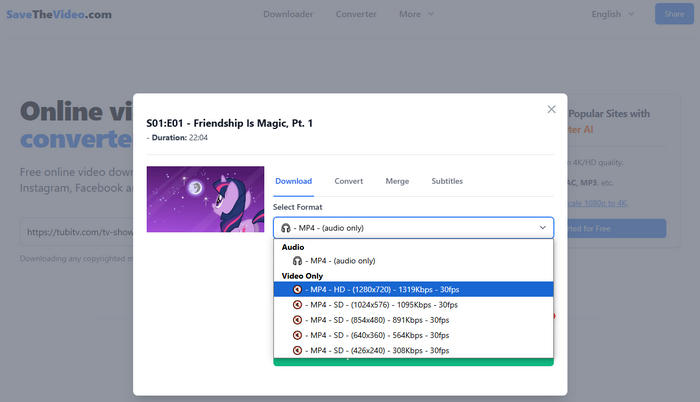
However, unlike TunePat, SaveTheVideo allows you to download video or audio only at a time. That means you cannot download Tubi videos with sound. To watch a Tubi movie and listen to the audio, you must play two media files simultaneously. Alternatively, you need to use some video editing programs to combine the video and audio, which isn't hassle-free.
Pros
- Free to download movies and shows from Tubi online.
- Download Tubi on Android, iPhone, computers, and more.
- Save Tubi in MP4 with 720p HD quality.
Cons
- The online website contains redirections, causing safety concerns.
- Cannot download Tubi video with audio.
How to Download Tubi Movies with SaveTheVideo
- Open the Tubi website and copy the URL of your targeted video.
- Access SaveTheVideo at 'https://www.savethevideo.com/home'.
- Paste the URL and click "Start".
- On the pop-up window, select to download audio or video and choose the quality as you like.
- Click "Start Download" to download movies on Tubi.
Keepvid Tubi Downloader — Tubi Movie Downloader
Keepvid Tubi Downloader allows you to download Tubi videos for offline viewing. It is another online Tubi TV downloader and starts Tubi video download by parsing video links. With Keepvid, you can watch Tubi movies without worrying about the network.
However, Keepvid doesn't always work. First, the website redirects you to another site upon your click. Second, the video links are not always supported, and Keepvid fails to parse them sometimes. Third, the download progress sometimes says resuming and doesn't start downloading correctly. Fourth, even if you successfully start downloading videos, the speed is very slow, and it says no network even though your device does have. With such disadvantages, it is recommended to use TunePat or AVC for Tubi video download, rather than Keepvid.
Pros
- Free to download Tubi videos.
- Keep Tubi videos in MP4 with 720p.
Cons
- The online website contains redirections.
- The download speed is slow.
- Fail to parse video link on web browsers sometimes.
- Low success rate.
How to Download from Tubi TV with Keepvid
- Copy a video link from the Tubi website.
- Paste the link to Keepvid and click "GO". You'll be taken to a new page.
- Click "GO" on the new page and wait for the parsing to be finished.
- Find your desired video quality, right-click the "DOWNLOAD" button, and choose "Save link as".
- Choose "Save" on the pop-up window, and the download will start.

Video DownloadHelper — Tubi Browser Downloader
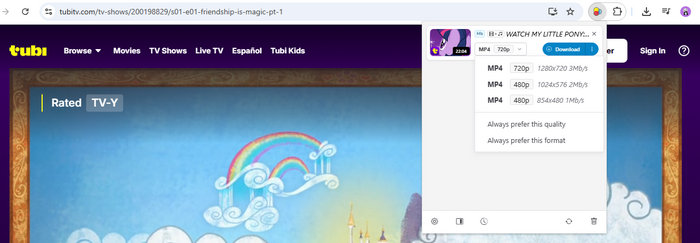
Video DownloadHelper helps you effortlessly download movies from Tubi on PC and MacBook. It is a browser extension that works on Chrome and multiple browsers to download videos from sites. This Tubi video downloader can detect videos playing on the Tubi website and then download them to your computer. Although it is just an add-on, it can download Tubi movies in MP4 with high definition up to 720p.
The Tubi browser downloader additionally allows you to download Tubi videos in different video qualities, meeting various demands. It has a fast download speed. An episode with 20 minutes can be fully downloaded in several minutes. But the speed is limited to about 1 Mb/s despite your fast network; you need to upgrade to a premium version for a faster speed. If you have casual downloads, using Video DownloadHelper is suggested.
Pros
- Download from Tubi for free without limits on the number.
- Convert Tubi videos to MP4 with up to 720p quality.
Cons
- The download speed is only 1 Mb/s.
How to Download Movies on Tubi with Video DownloadHelper
- Install the extension on your browser.
- Access the Tubi website and play a video.
- Click the extension's icon to let it parse the video.
- Choose a video quality, and click the download button to save Tubi movies or shows.
Note: Video DownloadHelper asks you to install its co-app on your device for accurately locating the video. Follow the tips to install it before downloading.
Part 2: Comparison of 5 Free Tubi Downloaders
What is the best Tubi TV downloader for you? This part draws a table to give you a clear comparison.
| TunePat | Any Video Converter | SaveTheVideo | Keepvid | Video DownloadHelper | |
|---|---|---|---|---|---|
| Compatibility | Windows, Mac | Windows, Mac | Online | Online | Chrome, Edge, Firefox |
| Free | ✔ | ✔ | ✔ | ✔ | ✔ |
| Format | MP4, MKV | MP4 | MP4 | MP4 | MP4 |
| Highest Quality | 1080p (and original) | 720p | 720p | 720p | 720p |
| Save Sound | ✔ | ✔ | ✖ | ✔ | ✔ |
| Download Speed | Fast | Fast | Fast | Slow | Medium |
| Success Rate | High | High | Medium | Lower | Medium |
| Safety | High | High | Low (too many redirections) |
Low (too many redirections) |
Medium |
| Update and Maintenance | Regular | Regular | Occasional | Occasional | Occasional |
| Distinctive Feature | Download from Netflix, Amazon Prime, and 1,000+ websites | Support 1k+ sites and video editing | No need to install | No need to install | Easy to use |
| Overall Performance /5 | ⭐⭐⭐⭐⭐ | ⭐⭐⭐⭐⭐ | ⭐⭐⭐ | ⭐⭐⭐ | ⭐⭐⭐⭐ |
Part 3: FAQs about Tubi
Does Tubi have ads?
Yes. Tubi has ads. Tubi is a free streaming service that allows everyone to watch movies and shows for free. In exchange, you will see some ads before starting video content, which helps Tubi keep the service.
How to download movies from Tubi on PC?
To download movies from Tubi on PC, the ultimate solution is to use TunePat VideoGo All-In-One. It can download any movies and shows from Tubi to PC and Mac, without charging a penny. You can download unlimited videos and save Tubi movies in MP4 with HD quality.
How is StreamFab Tubi Downloader?
StreamFab offers you a Tubi download feature to download videos from Tubi for offline watching on computers. However, it is not free. The free version allows you to download only 3 videos from Tubi. To download more titles, you have to pay at least $50, which is quite expensive. The best alternative to StreamFab Tubi Downloader is TunePat VideoGo All-In-One, which allows you to download unlimited videos from Tubi for free.
Conclusion
Although Tubi doesn't have a download feature, you can download movies from Tubi with a Tubi downloader. By reading this article, you get the best 5 free Tubi downloaders. With the tools, you can download Tubi movies in MP4 with HD quality. When most of them have disadvantages, TunePat VideoGo All-In-One stands out as the best Tubi downloader for its free of charge, no download limit, fast speed, HD support, and absolute safety. Do not hesitate, try TunePat to download unlimited Tubi movies for free now!



Izzy Warren
Content Writer