Yellowstone Season 1-5 Download: How to Save All Episodes
 By Izzy Warren
Topic
Updated on 08/09/2026
By Izzy Warren
Topic
Updated on 08/09/2026
The first five seasons of Yellowstone have attracted a large audience. If you want to revisit the story without relying on online streaming every time, you may prefer to save Yellowstone Seasons 1-5 locally for offline viewing. However, finding a suitable way to download the episodes can be challenging. So, how can you download Yellowstone Seasons 1-5 for offline viewing?
In this guide, we'll first introduce where to watch the series and provide some key information about the first five seasons. Then, we'll show you how to use TunePat to download Yellowstone episodes and save them for offline playback.
Content

Part 1: Yellowstone Seasons 1-5: What You Need to Know
1.1 Yellowstone Seasons 1-5: Story, Seasons, and Episodes
Yellowstone follows a ranching family as they fight to protect their ancestral land amid the pressures of modern business, politics, Native American interests, and conflicts within the family itself. The series premiered in 2018 and includes 53 episodes across its first five seasons. The first season has nine episodes, followed by three seasons with 10 episodes each, while Season 5 expanded to 14 episodes, making it the longest of the first five seasons.
1.2 Where to Watch Yellowstone Seasons 1-5
If you want to watch Yellowstone Seasons 1-5 in the U.S., you can stream all five seasons on Peacock. The series originally aired on Paramount Network, which still broadcasts reruns and marathons, but Yellowstone is not available for streaming on Paramount+.
1.3 How to Watch Yellowstone Seasons 1-5 Offline
1. Download Yellowstone in the Peacock App
Peacock Premium Plus subscribers can download Yellowstone Seasons 1-5 through the Peacock app for offline viewing. You can watch them in the Peacock app without an internet connection.
Note: There are some limitations to keep in mind. Offline downloads are available only on supported mobile devices, such as smartphones and tablets, and downloaded episodes can only be watched within the Peacock app. They cannot be downloaded or played as local video files on a computer.
2. Watch Yellowstone on DVD or Blu-ray
You can also purchase the complete Seasons 1-5 DVD collection from Amazon. The physical discs let you watch the series without an internet connection, provided you have a compatible DVD player or a computer with a DVD drive.
Note: This requires you to have access to the discs whenever you want to watch the series. You'll also need a compatible DVD player or disc drive, which may be less convenient than having the episodes stored digitally as local video files.
3. Save Yellowstone as Local Video Files
If you prefer more flexibility when watching Yellowstone offline, saving the episodes as local video files is another option. Stored on your computer, these files can be played without relying on the Peacock app or keeping physical discs on hand. In the following section, we'll show you how to download Yellowstone Seasons 1-5 with TunePat VideoGo All-In-One.
Part 2: How to Download Yellowstone Seasons 1-5
TunePat VideoGo All-In-One is a video downloading tool that supports downloads from Peacock and 1,000+ other streaming services, allowing you to save Yellowstone and other movies and TV series to your Windows PC or Mac for offline viewing. The software lets you save videos in MP4 or MKV format at up to 1080p resolution, while retaining 5.1-channel audio and multilingual subtitles. Once downloaded, episodes are stored locally, allowing you to watch them offline without opening the streaming service's app or staying connected to the internet.

TunePat VideoGo All-In-One
- Download movies and shows from Netflix, Amazon Video, Disney+, and other streaming services in batches.
- Free download videos from YouTube, Vimeo, etc.
- Preserve HD videos in MP4/MKV format at high speed.
- Retain multilingual subtitles and audio tracks (including 5.1 audio).
- Select video quality, audio tracks, and subtitles as you wish.
- Get permanent offline playback for movies and shows at any time.
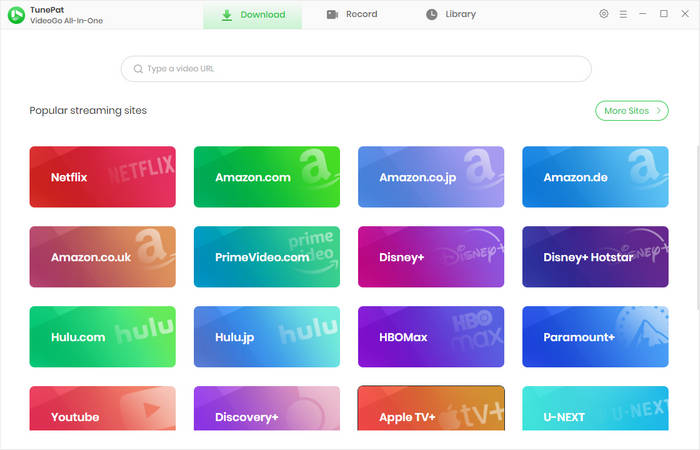
Step 1 Launch TunePat VideoGo All-In-One on your computer and select the Peacock option from the "Popular Streaming Sites" section on the main interface. The built-in Peacock web player will then appear; follow the prompts to log in to your Peacock account.
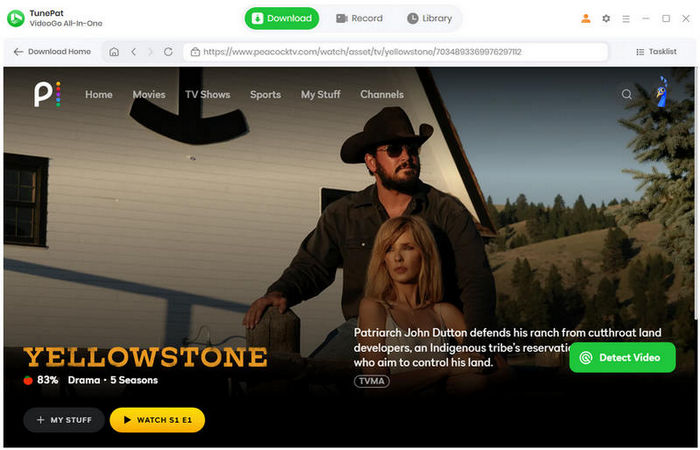
Step 2 Search for Yellowstone directly within the built-in Peacock web player, just as you normally would, and click the "Detect Video" button; TunePat will then load all episodes from every season.
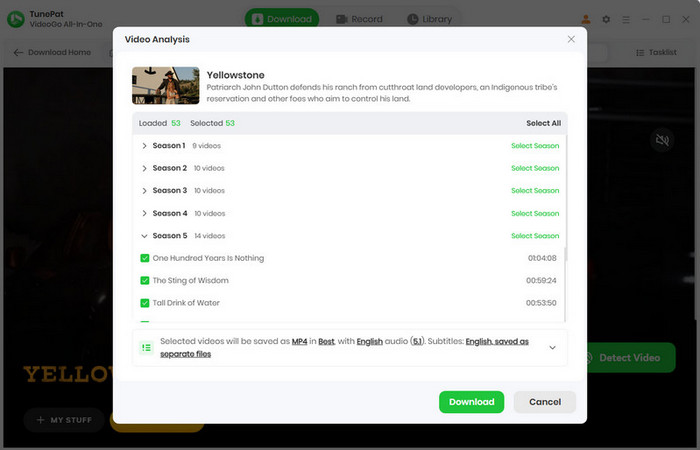
Step 3 Next, in the pop-up window, select your preferred format, quality, audio tracks, and subtitles for the Yellowstone video. Click the "Download" button to start the download task. All episodes will appear in the right-hand panel. Once a video finishes downloading, the system will automatically begin the next task without requiring manual input.
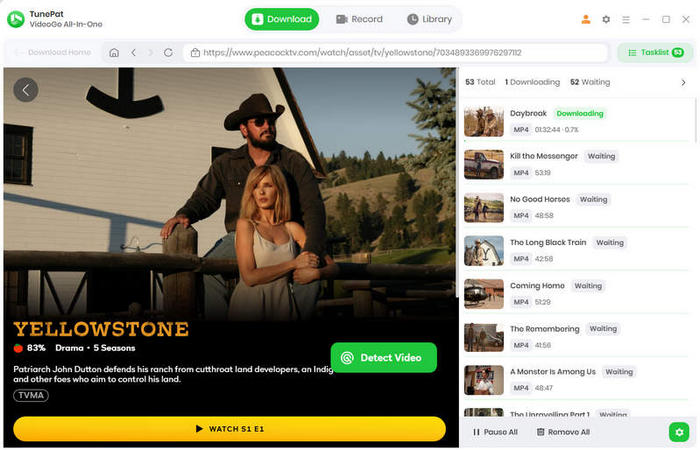
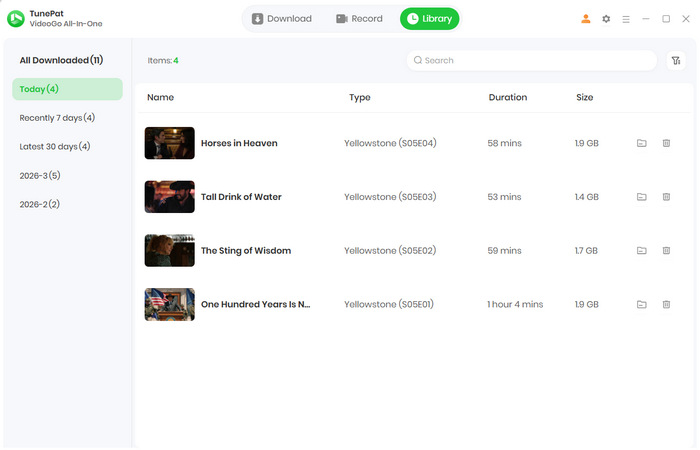
Step 4 Once the download is complete, you can view your download history in the "Library". You can then watch Yellowstone Seasons offline anytime, anywhere, without needing an internet connection.
FAQs About Downloading Yellowstone Seasons 1-5
Q1: Can I Download All Five Seasons of Yellowstone?
Yes. You can download all five seasons of Yellowstone, which include 53 episodes in total, for offline viewing. If you want to save the episodes as local video files rather than relying on physical DVDs or streaming apps, you can use a dedicated video downloader such as TunePat VideoGo All-In-One. It allows you to download supported videos to your computer and watch them offline at your convenience.
Q2: Can I Download Yellowstone with Subtitles?
Yes. If subtitles are available on the streaming platform, TunePat can download them along with the Yellowstone episodes. This allows you to keep the original subtitles when saving the episodes to your computer, so you can watch Yellowstone offline with subtitles without having to add them manually later.
Q3: How Much Storage Space Do I Need to Download Yellowstone Seasons 1-5?
The required storage space depends on the video quality and output format you choose. If you download all five seasons of Yellowstone in 720p, we recommend having at least 50 GB of free space available on your computer. Higher-quality videos, such as 1080p, may require more storage. Based on our actual testing, a 1080p video that is about one hour long takes up approximately 2 GB of storage.
Conclusion
If you want to download Yellowstone Seasons 1-5 and watch the series offline, TunePat VideoGo All-In-One provides a convenient way to save supported episodes as local video files. Instead of relying on an internet connection or keeping physical discs on hand, you can download Yellowstone from Peacock to your Windows PC or Mac and choose your preferred video quality, audio tracks, and subtitles.
With support for Peacock and 1,000+ other streaming services, TunePat VideoGo All-In-One is not limited to Yellowstone. It can also help you save movies and TV shows from various supported platforms for offline viewing, making it a practical option if you regularly watch content from different streaming services.






Izzy Warren
Content Writer