How to Download 4K Movies on Netflix to Computers
 By Amelia Gonzalez
Netflix Video Tips
Updated on 05/08/2025
By Amelia Gonzalez
Netflix Video Tips
Updated on 05/08/2025
Can you watch movies on Netflix in 4K? Netflix boasts the largest 4K library of titles, including movies, TV shows, and documentaries. As long as you have the Premium plan, you can watch Netflix movies in 4K. Unfortunately, Netflix doesn't allow you to download movies in 4K but HD quality. This is the problem that we are going to solve in this article. Read and find out how to download Netflix 4K movies for offline playback on computers.
Contents

Part 1: Download Netflix 4K Movies on Computers
Can you directly download Netflix movies in 4K? Unfortunately, you cannot save 4K quality from Netflix, whether you use the Netflix app or a Netflix downloader. The only working way to watch Netflix 4K movies offline is to download them in HD and upscale the quality to 4K. To upscale the quality, you need to get the video files first. And using a Netflix downloader is necessary.
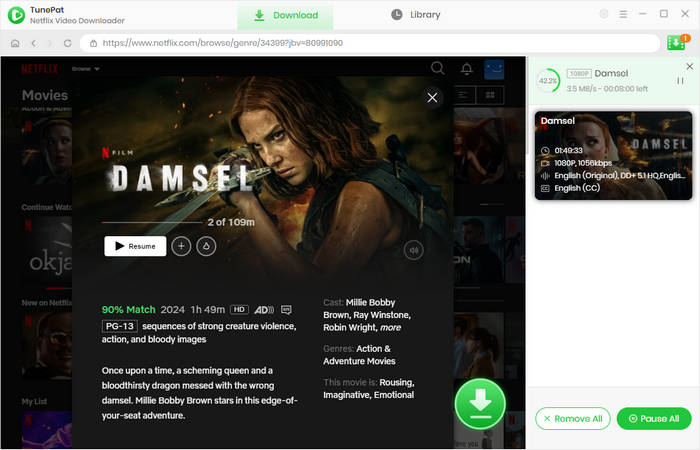
TunePat Netflix Video Downloader is a professional tool for downloading Netflix movies and TV series in HD. With advanced technology applied, it can save 1080P quality for crystal-clear offline playback. Besides, you are allowed to download Netflix movies in 720P, 540P, and 480P to adapt to different storage spaces.
TunePat can help you effortlessly extract video files from Netflix and save them on your computer. All the videos can be downloaded in MP4 or MKV format, which are playable permanently on any device. It is efficient, which means you can download videos at a fast speed and save them in batches. This tool also meets your demands of keeping audio tracks and subtitles in multiple languages.

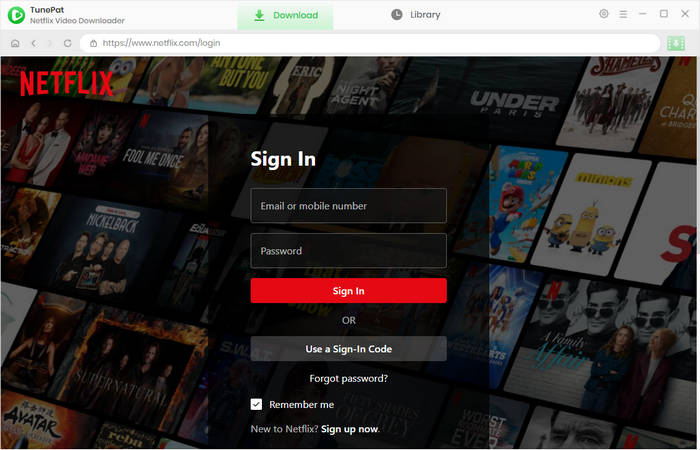
Step 1 Log in to Netflix on TunePat
Start TunePat on your computer, and you will see the built-in Netflix web browser. Please click "Sign In" to enter your Netflix account and password.
Step 2 Choose General Settings
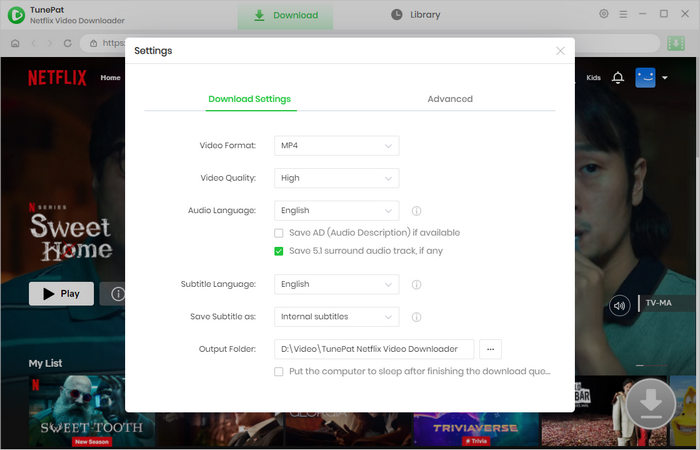
Click the "Settings" icon that looks like a gear. You can then choose the output settings, including video format, video quality, audio and subtitle language, subtitle type, and the output folder where you want to save the downloaded videos.
Step 3 Select a Netflix Movie to Download
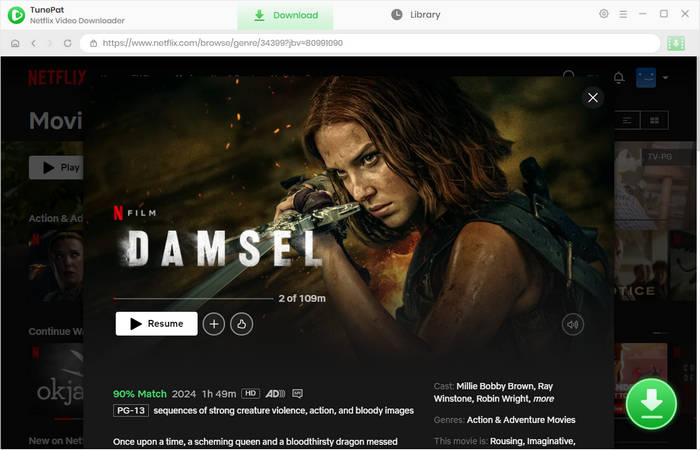
Browse the Netflix web browser to open your favorite movie or TV series. Alternatively, paste the video link into TunePat's search box, which can help you quickly locate the video. Then click the green arrow icon. TunePat will parse the title.
Step 4 Pick Advanced Download Settings
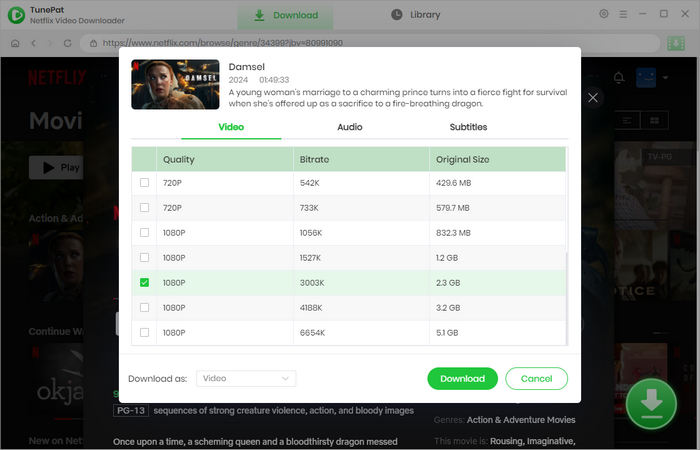
Select the specific video quality, audio tracks, and subtitles as you like. If you are downloading a TV show, you can choose the season and episodes first; then click "Advanced Download" to get the options.
Step 5 Download Netflix Video in HD
After all things are set, click the "Download" button to start downloading Netflix movies or shows in HD on your computer. Once completed, all downloaded videos can be found in the "Library" tab, and you can see the video files in the local folder.
Part 2: Upscale Netflix Movies from HD to 4K
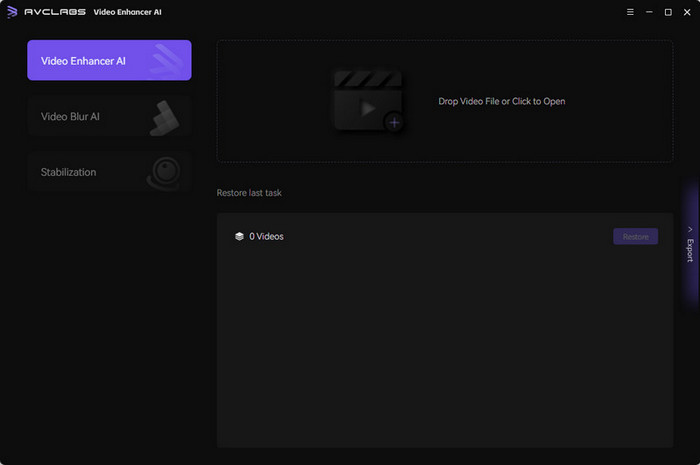
Netflix allows users to download up to 1080P only. Therefore, you have to improve the video quality from 1080P to 4K. AVCLabs Video Enhancer AI, an AI-based video enhancement tool, supports upscaling video resolution from low to high. It utilizes multi-frame enhancement to improve the visual quality, providing a better visual experience by preserving quality and details as much as possible.
AVCLabs Video Enhancer AI can upscale Netflix movies from HD to 4K or 8K, so that you can immerse yourself in the plots. It can also recover your old videos, which are blurry or have low resolution. The process is super easy, and there are no technical requirements to use it. Just follow the steps below, and you can easily get Netflix movies in 4K.
Step 1 Open AVCLabs Video Enhancer AI on your computer, then drag and drop the downloaded Netflix videos to the area.
Step 2 Choose some setting options, such as an AI model and the resolution you prefer.
Step 3 Click "Start Processing", and the program will start to upscale 1080P to 4K.
Part 3: FAQs about Netflix 4K Movies
How to watch movies on Netflix in 4K?
To watch Netflix movies in 4K, several requirements must be met. First, you should subscribe to the Netflix Premium plan. Second, your network speed must be at least 15 Mbps; otherwise, Netflix will lower the quality to ensure a smooth streaming. Third, the movie must have 4K; not all Netflix movies are in 4K; remember to check the 4K and HDR labels. The last and most important one is to have a 4K-suppoted device; make sure your smart TV (streaming device, or game console) can stream 4K video, you should use a Premium High Speed HDMI or Ultra High Speed HDMI cable, and devices and cables are plugged into an HDMI port that supports HDCP 2.2 or later.
How to find movies on Netflix that are 4K?
Simply type "4K" or "HDR" in Netflix to search for 4K titles. Then open the details page, and the title should have the "4K" and "HDR" labels. It is important to note that, when your device doesn't support streaming 4K, Netflix will show the highest quality available on your end. For example, a 4K movie may show only HD, because HD is what your device supports.
What are the best 4K films on Netflix?
The best 4K films on Netflix include 'The Irishman', 'All Quiet on the Western Front', and 'Enola Holmes'. For more Netflix 4K movie titles, please check 10 Best 4K Ultra HD Movies on Netflix.
Conclusion
Although you cannot save 4K quality from Netflix, you can watch Netflix movies in 4K offline. TunePat Netflix Video Downloader and AVCLabs Video Enhancer AI have solved the problem. With TunePat Netflix Video Downloader, you can download thousands of movies and shows from Netflix in 1080P. By using AVCLabs Video Enhancer AI, you can increase the video resolution from HD to 4K. Finally, you can enjoy those UHD videos at any time.





Amelia Gonzalez
Web Editor