
Most people want to download MP4 movies because MP4 movies can play smoothly on laptops, phones, tablets, USB drives, and even TVs. But the real challenge is not just finding an MP4 movie downloader; it’s finding one that can reliably download HD movies while keeping the audio clear and high quality. The current download ecosystem is far from perfect. Some sites only offer MKV, others are full of ads or fake download buttons, and many tools are slow or unstable during downloads. These issues directly impact file quality and the overall user experience. This guide provides a practical look at several reliable tools for an MP4 movie download, offering an objective reference to help you choose the right tool.
Contents
Part 1: Best Desktop Software for Downloading MP4 Movies
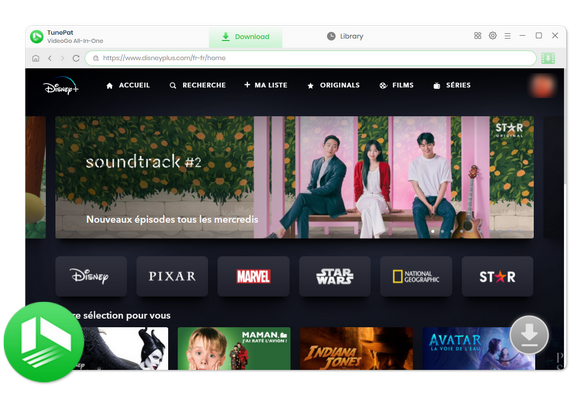
Mentioning MP4 Movie Download, TunePat VideoGo All-In-One is a top choice. It supports downloads from over 1,000 websites, including popular platforms such as Netflix, Crunchyroll, Hulu, Paramount Plus, and HBO Max. You can easily save videos in MP4 or MKV format with HD quality preserved. A key advantage is its efficiency: it supports fast batch downloading, allowing you to queue multiple movies and have each typically ready in just a few minutes with a single click. In short, with TunePat VideoGo All-In-One, you can download MP4 movies to your computer for offline viewing anytime. Once downloaded, the downloaded MP4 videos can also be transferred to SD cards, USB drives, or other devices for convenient playback.
TunePat VideoGo All-In-One
- Download movies and shows from Netflix, Amazon Video, Disney+, and other streaming services in batches.
- Free download videos from YouTube, Abema, etc.
- Preserve HD videos in MP4/MKV format at high speed.
- Retain multilingual subtitles and audio tracks (including 5.1 audio).
- Select video quality, audio tracks, and subtitles as you wish.
- Get permanent offline playback for movies and shows at any time.
In this section, we will present how to download movies from popular streaming services. If you prefer to record a video from any movie site, please refer to record videos with TunePat.
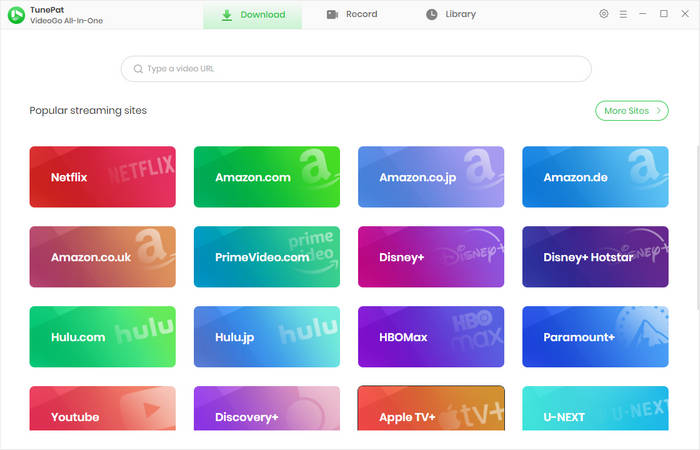
Step 1 Run TunePat VideoGo All-In-One on your computer. Once opened, navigate to the "Download" tab and select the website from which you want to download movies. The built-in web player will automatically appear, allowing you to browse the platform directly within TunePat. Make sure to log in to your account on the selected streaming service so that TunePat can access your library and available content.
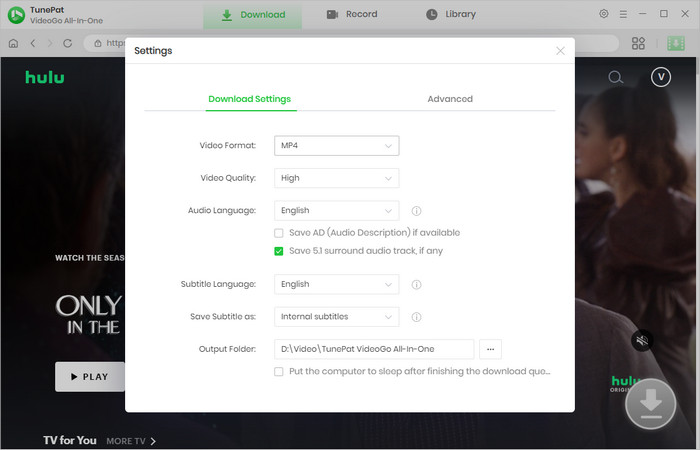
Step 2 Click the "Settings" icon. Here, you can customize your download preferences, such as the "Video Format", "Video Quality", "Audio Language", "Subtitle Language", and the destination folder where the downloaded files will be saved. Adjusting these settings ensures that your downloads match your viewing preferences and device compatibility.
Step 3 Browse through the website using the built-in player and open the movie you want to download. Once on the movie page, click the green download icon. TunePat will start parsing the video, preparing it for download. This process allows you to choose exactly what content you want to save without having to navigate external download tools.
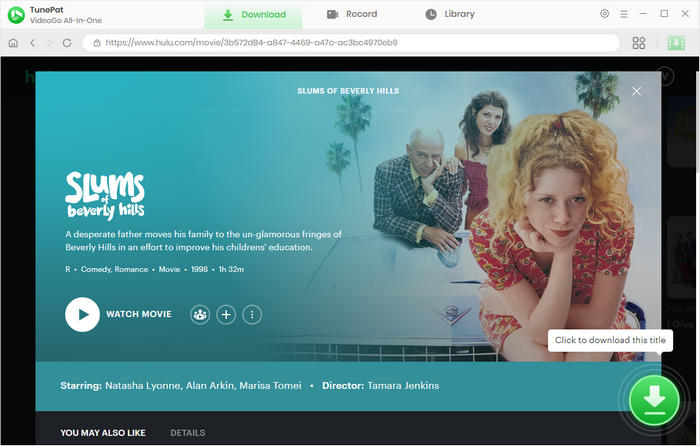
Step 4 A pop-up window will appear, giving you the option to select specific video quality, audio tracks, and subtitles. This is particularly useful if you want to preserve multiple language tracks or choose a specific resolution for your device. Make sure to review these options carefully to ensure the downloaded movie meets your needs.
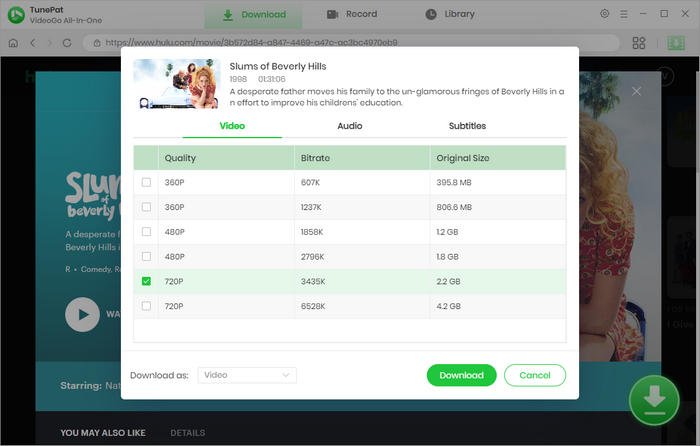
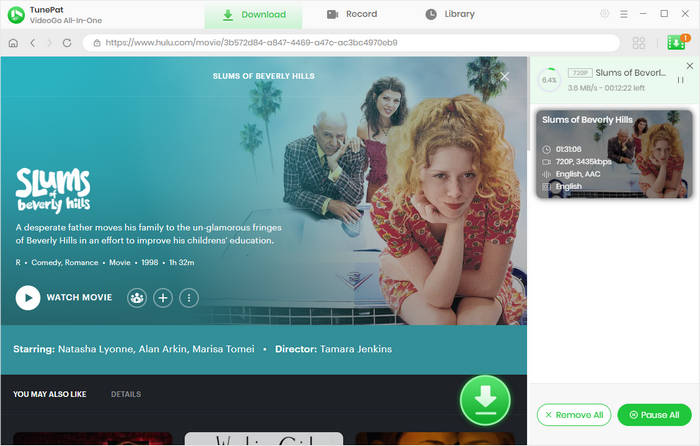
Step 5 After confirming your settings, click the "Download" button to begin the download process. TunePat will save the movie to your selected folder. Once the download is complete, you can watch the movie offline anytime, even in environments with restricted internet access. Additionally, the downloaded files can be transferred to other devices like USB drives or SD cards for convenient playback wherever you go.
Rating
- Supports 1000+ websites, including major platforms.
- Maximum download quality varies by site, up to 8K.
- High-speed batch downloads to save time.
- Currently only available on desktop.
Part 2: Top Free Online Sites for MP4 Movie Download
In this section, we review three popular platforms, provide step-by-step download guides, and rate them across multiple criteria.
FZMovies
🔗 https://fzmovie.co.za/
FzMovies is a global online platform where users can stream and download HD movies for free, with MP4 movie download being a popular option. It features a diverse library spanning Hollywood, Bollywood, and Nigerian films and TV shows. The platform is easy to use, mobile-friendly, and supports multiple formats like MP4, MKV, and 3GP in various resolutions, including HD. It also offers multilingual subtitles, all without requiring a subscription. Additionally, FzMovies enhances user experience through social media engagement and personalized in-app recommendations.
Step 1 Even tech novices can easily get started with FzMovies. First, visit its valid domain, such as the one we listed above. You'll see thumbnails of recently added movies on the homepage, including popular action blockbusters and animated films. You can use the search bar at the top to enter the movie title.
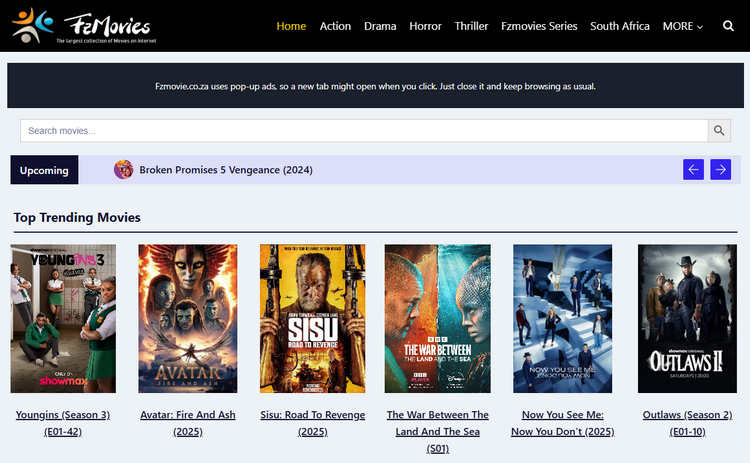
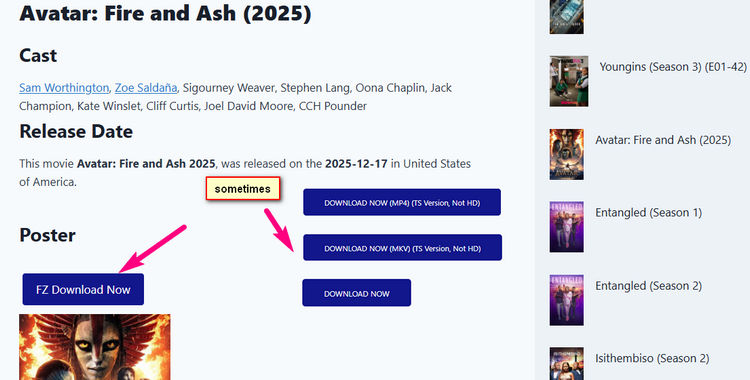
Step 2 Once you find the movie you want to watch, click on the poster to go to the details page, which includes a synopsis, cast, release date, and download link. The download button is different for each movie; simply click the blue button, and the page will begin loading. If the movie offers multiple formats, remember to select the MP4 format. Pop-up ads may appear during the download process; please ignore them. To watch online, click play (if a playback option is available).
Rating
- No direct link parsing, but allows in-site searching.
- Supports MP4, MKV, and 3GP with quality options.
- Only one movie can be downloaded per session.
- Available for use on both mobile and desktop devices.
CoolMovies
🔗 https://www.coolmoviez.xin/
Coolmoviez is a popular online platform primarily for MP4 movie download, offering films and TV series from Hollywood, Bollywood, and other regions. It provides free access to the latest content, though it is worth noting that the site frequently changes domains, which can affect reliability. Beyond downloads, it also aggregates links to major streaming services like Netflix, Disney+, and Amazon Prime Video, serving as a convenient hub for diverse video content.
Step 1 First, copy the website URL listed above and open it in your browser. You will see the homepage displaying many of the latest movies and TV shows. You can directly use the categories at the top of the homepage to search for the movie you want, or you can browse for movies directly. Although the website supports some online streaming platforms, it does not support direct link parsing.
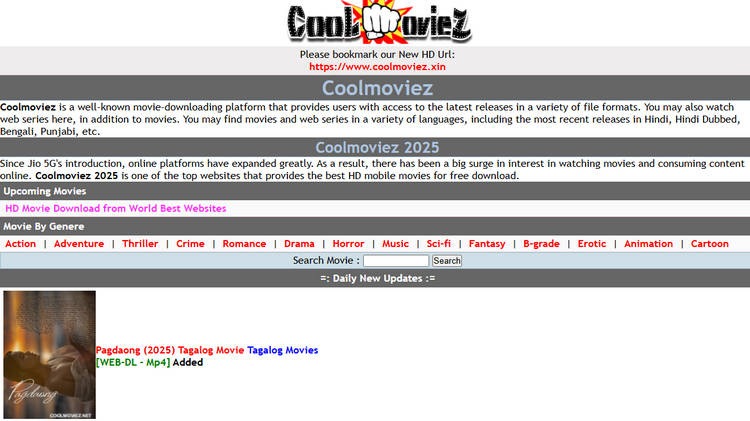
Step 2 After clicking on a thumbnail, you will see which streaming platform the movie comes from, as well as the available formats and resolutions. Choose the one you want and click on it.

Step 3 Click "Click to Go to Download Page", then click again on the movie you want to download. After that, you can wait for the download to complete. Although the download process is a bit tedious, there are no ads or redirects, so it is relatively safe.
Rating
- In-site search available for movies and series.
- Supports MP4 and MKV formats with quality selection.
- Single download per session is allowed.
- Accessible on both desktop and mobile devices.
Savefrom.net
🔗 https://en1.savefrom.net/16xF/
Unlike the standalone downloaders mentioned earlier, Savefrom.net takes a different approach. It works by letting users paste video URLs directly. Savefrom.net is also very popular, mainly for downloading MP4 movies and audios from a wide range of platforms, including YouTube, Facebook, Instagram, and TikTok.It allows users to download content for free with a simple and convenient operation. One point to note is that the site does occasionally change domains, which can lead to temporary access instability.
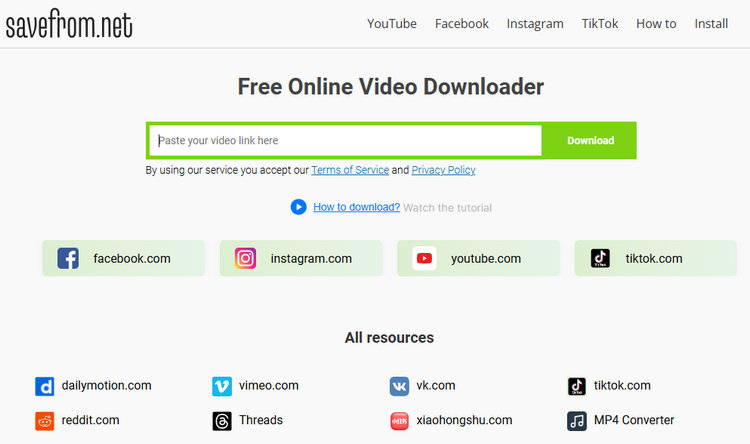
Step 1 Copy the link above and open it in your browser. You will see which platforms Savefrom.net supports for parsing download links. Then you can directly paste the video URL you want to download into the input box.
Step 2 After pasting the link, the website will automatically parse the video and display the available formats and resolutions. Choose MP4 or other supported formats as needed, then click the download button.
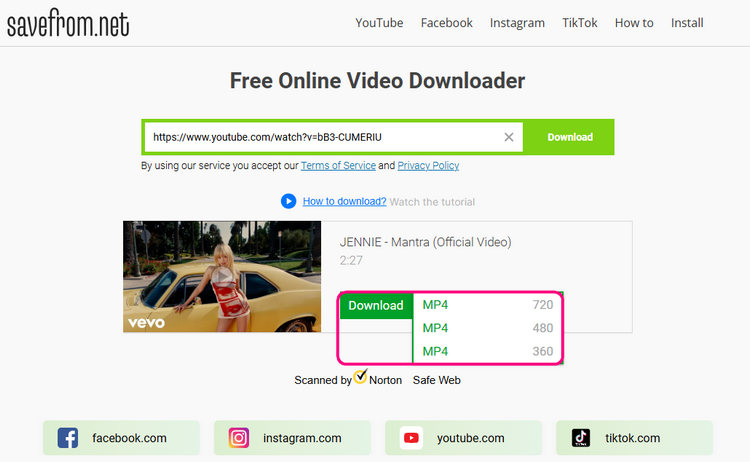
Step 3 Click "Download" and the page will show a progress bar. When prompted that the video is ready, click "Download video" and wait for the file to finish downloading. The entire process is simple, without pop-up ads or redirects, making it relatively safe.
Rating
- Supports downloads from 10 different video websites.
- MP4 movie downloads are often limited to 720p.
- Batch download is not supported.
- Compatible with desktop and mobile devices.
Part 3: FAQs About MP4 Movie Download
Q1: Can I download MP4 movies on a mobile phone?
Yes, the online tools we introduced above can download MP4 movies. These are compatible with most smartphones, including Android and iOS devices. The MP4 format has strong compatibility, so downloaded videos can usually be played directly using your phone's built-in media player. Please ensure your device has sufficient storage space and a stable internet connection for a smooth download.
Q2: Is MP4 the best format for downloading movies?
MP4 is one of the most popular formats for downloading movies because it provides a good balance between video quality and file size, and is compatible with nearly all devices and media players. While other formats like MKV or AVI can offer higher quality or additional features, MP4 remains the most convenient and widely supported choice for most users.
Q3: How do I ensure the MP4 movie download is safe?
For safe MP4 movie download, it’s essential to stick to trusted tools and avoid unfamiliar websites or suspicious ads. Using a reliable movie downloader greatly lowers the risk of malware and security threats. As a trusted desktop tool, TunePat VideoGo All-In-One is a secure option designed to keep your system protected.
Conclusion
Downloading MP4 movies makes offline viewing convenient, whether on your computer or mobile device. Tools like TunePat VideoGo All-In-One make it easy to download HD videos, multiple audio tracks, and subtitles from popular streaming platforms, ensuring a reliable and convenient viewing experience. For users who prefer free online resources, the tools we introduce, FZMovies, CoolMovies, and Savefrom.net, also offer a wealth of movie resources, but be aware of issues such as domain name changes and download restrictions. Of course, we highly recommend TunePat VideoGo All-In-One. If you're interested, click to download and give it a try!

Izzy Warren
Content Writer