NoteBurner Netflix Video Downloader Review: Is It Worth It in 2026?
 By Izzy Warren
Topic
Updated on 31/08/2026
By Izzy Warren
Topic
Updated on 31/08/2026
Looking for an honest review of NoteBurner Netflix Video Downloader? We tested the software to see how well it actually performs under our test conditions. Our evaluation covered download success rate, video and audio quality, subtitle retention, and download speed. Below, we'll walk you through our test results and share what we liked and what could be improved.
Contents
Part 1: Quick Verdict
5/5
4.5/5
4.5/5
4/5
4/5
Overall, NoteBurner performed well in our tests, offering reliable downloads, good video and audio quality, proper subtitle retention, and a stable download experience.
Part 2: What Is NoteBurner Netflix Video Downloader?
NoteBurner Netflix Video Downloader is a desktop application designed to download movies and TV shows from Netflix for offline viewing. It is available for Windows and macOS and requires users to sign in with their Netflix account before downloading. The software provides options for video quality, audio tracks, subtitles, output format, and other download settings. Some of these features can vary depending on the Netflix title and account, so we tested them separately in the following sections.
Part 3: How We Tested NoteBurner Netflix Video Downloader
3.1 Test Environment
We tested NoteBurner Netflix Video Downloader 4.0.2 on a Windows 11 desktop computer in August 2026. The test computer was equipped with an Intel Core i3-14100 processor, 16GB of RAM, and a 477GB SSD. We used a paid Netflix account in the US region and conducted the tests over a company network.
3.2 What We Tested
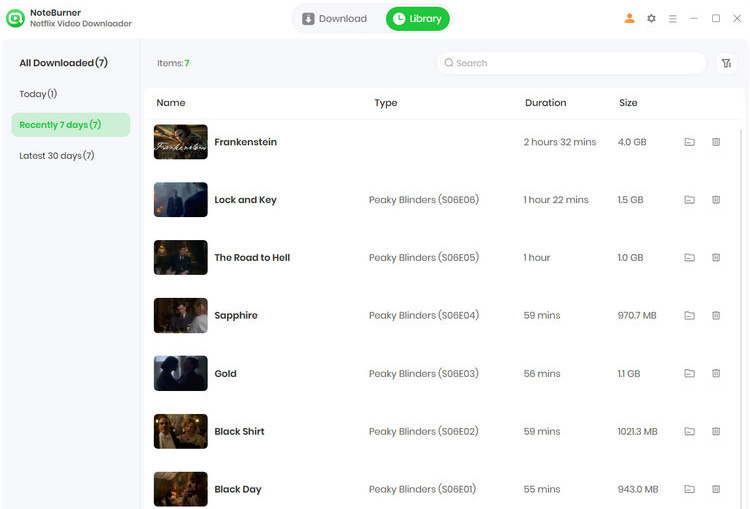
To evaluate NoteBurner Netflix Video Downloader across different types of content in real-world use, we tested seven videos in total: the movie Frankenstein and six episodes from Season 6 of Peaky Blinders. Rather than focusing only on whether the downloads completed successfully, we also checked the quality and usability of the downloaded files. Our tests covered download success rate, video quality, audio quality, subtitle handling, and download speed.
Part 4: NoteBurner Netflix Video Downloader Performance Test
4.1 Download Success Rate
All seven videos selected for our test were downloaded successfully, with no failed or interrupted downloads during testing. While this does not guarantee the same result for every Netflix title, the results show that NoteBurner performed reliably with the titles we tested under our test conditions. Since streaming platforms may change their technical systems or playback mechanisms over time, occasional compatibility issues can still occur. If you encounter an error that cannot be resolved, you can contact the NoteBurner Support Team for further assistance.
4.2 Video Quality
We checked the technical parameters of all seven downloaded videos with MediaInfo to evaluate their video quality. As summarized in the table below, all seven videos were downloaded in 1920*1080 resolution with H.264/AVC video encoding. The frame rates and video bitrates varied slightly between videos, which is normal for different video files.
| Title | Resolution | Frame Rate | Video Codec | Video Bitrate |
|---|---|---|---|---|
| Frankenstein | 1920*1080 | 24 FPS | H.264/AVC | 2,801 Kbps |
| Peaky Blinders S6 E1 | 1920*1080 | 25 FPS | H.264/AVC | 1,712 Kbps |
| Peaky Blinders S6 E2 | 1920*1080 | 25 FPS | H.264/AVC | 1,738 Kbps |
| Peaky Blinders S6 E3 | 1920*1080 | 25 FPS | H.264/AVC | 2,207 Kbps |
| Peaky Blinders S6 E4 | 1920*1080 | 25 FPS | H.264/AVC | 1,646 Kbps |
| Peaky Blinders S6 E5 | 1920*1080 | 25 FPS | H.264/AVC | 1,821 Kbps |
| Peaky Blinders S6 E6 | 1920*1080 | 25 FPS | H.264/AVC | 2,007 Kbps |
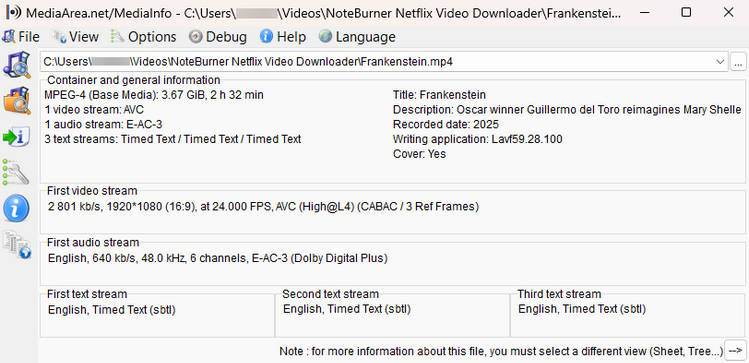
For example, the downloaded Frankenstein file was 1920*1080 at 24 FPS, with H.264/AVC encoding and an average video bitrate of around 2,801 Kbps. The 3.67 GB file contained the full 2-hour-32-minute movie, and playback showed clear and stable picture quality. The MediaInfo details are shown in the screenshot below.
4.3 Audio Quality
We also checked the audio streams of all seven downloaded videos with MediaInfo. All seven files retained an English E-AC-3 (Dolby Digital Plus) audio track with a 640 Kbps bitrate, a 48 kHz sampling rate, and 6 channels. During playback, the audio was clear and well synchronized with the video, with no obvious quality issues.
4.4 Subtitles
Subtitle support was also included in our test. We checked the subtitle streams of all seven downloaded videos with MediaInfo. All seven MP4 files retained English timed-text subtitle tracks, although the number of available tracks varied between videos. Frankenstein retained three English subtitle tracks, while the tested episodes of Season 6 of Peaky Blinders retained one or two tracks depending on the episode. The subtitles were preserved as separate tracks rather than permanently embedded into the video, and we were able to select the available subtitle tracks during playback.
4.5 Download Speed
In our tests, NoteBurner showed stable download performance for both movies and TV episodes. A 2-hour-32-minute movie took 12 minutes and 46 seconds to download, while downloading six episodes from Season 6 of Peaky Blinders in batch took about one hour in total. All seven downloads completed without interruption. Actual download times may vary depending on video length, network conditions, and server load.
Part 5: What We Like and What Could Be Better
What We Like
- Reliable downloads: All seven Netflix titles we tested were downloaded successfully, with no failed or interrupted downloads. This was one of the strongest aspects of NoteBurner in our testing.
- Solid Video and Audio Quality: The downloaded movie retained 1080p video with H.264/AVC encoding and an E-AC-3 audio track at 640 Kbps. Both video and audio played clearly without noticeable quality issues.
- Subtitle Retention: NoteBurner retained English timed-text subtitle tracks in all seven test files. The number of available tracks varied between videos, and the subtitles were preserved as separate tracks that could be selected during playback.
- Batch Download Support: Six episodes from Season 6 of Peaky Blinders were downloaded in batch in about one hour, which can be useful when saving multiple episodes at once.
What Could Be Better
- No Parallel Downloads: NoteBurner supports adding multiple episodes to a batch, but the downloads are currently processed one at a time rather than in parallel. As a result, downloading several episodes can take longer than it would with simultaneous downloads.
- Limited Trial Version: The trial version only allows users to download the first 5 minutes of each Netflix video. While this is enough to test the basic download process and output quality, it may not be sufficient for users who want to evaluate the full-length downloading experience before purchasing.
FAQ About NoteBurner Netflix Video Downloader
Q1: Is NoteBurner Netflix Video Downloader safe?
Yes. In our test, we did not encounter suspicious pop-ups, unwanted bundled software, or other obvious security issues during installation and use. NoteBurner also states on its official website that its software is free of viruses and plugins.
Q2: Can I use NoteBurner Netflix Video Downloader for free?
No, but NoteBurner Netflix Video Downloader offers a free trial. You can download and install the program to try its features before purchasing a license. The trial version has certain limitations, while registering the software with a valid license unlocks the full version.
Q3: Does NoteBurner support 1080p Netflix downloads?
Yes. NoteBurner Netflix Video Downloader supports Netflix downloads in up to 1080p Full HD quality. In our test, the downloaded movie was saved at 1920*1080 resolution with H.264/AVC video encoding, confirming that 1080p output worked successfully in our testing.
Conclusion
Based on our tests, NoteBurner Netflix Video Downloader delivered a reliable overall performance. That said, our testing covered a relatively small selection of Netflix videos and configurations, so the results should not be taken as a guarantee for every movie, TV show, language, or playback setting. Download speeds can also vary depending on network and server conditions. Overall, however, NoteBurner earned a 4.4/5 rating in our testing and proved to be a solid option for users looking for a reliable way to save Netflix content for offline viewing.



Izzy Warren
Content Writer