
1. Launch TunePat on your computer, click on the  icon to open the registration window.
2. Copy and paste your email address and license code you received by email. Then click "Register" to activate the program.
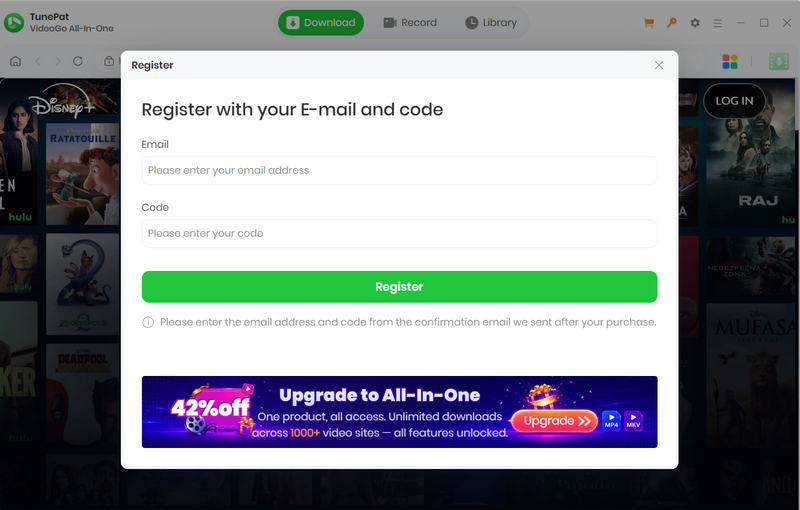
1. Launch TunePat on your computer, click on the icon to open the registration window.
2. Copy and paste your email address and license code you received by email. Then click "Register" to activate the program.
Please right-click the program icon and select "Run as administrator" from the context menu. Then click on the  icon on the upper right corner of the screen and click "Register" from the menu list, enter your registration email and code into the pop-up dialog window.
Any movie or TV show that can be played normally on Hulu through the web browser can be downloaded by TunePat Hulu Video Downloader.
TunePat offers three subtitle encoding options to meet users' needs for playing video on different media players or devices.
TunePat supports hardware acceleration with Intel/NVIDIA/AMD graphics cards, which will enable you to run the program more smoothly and speed up the download process. To get the best performance, please make sure you have the latest graphics driver installed on your computer. Here is how to check and upgrade the graphics cards:
If a conversion fails, try these troubleshooting steps first:
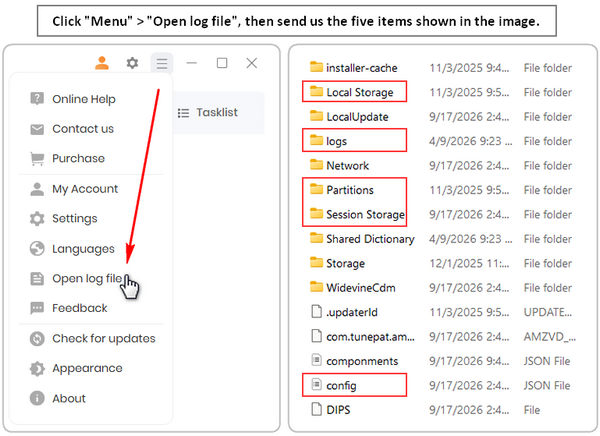
If the problem persists, please contact us at support@tunepat.com or via Menu > Feedback. Please clearly describe the issue, the troubleshooting steps you have already tried, and the results. To help us investigate the problem more efficiently, please also provide the following information:
TunePat offers a money-back guarantee within 5 days for annual plans and 30 days for the lifetime plan, effective from the date of purchase. For more details, please visit the Refund Policy.