
New feature 🔥 TunePat VideoGo now records videos from any website at up to 8x speed — say goodbye to real-time recording! Learn More

Amazon Video Downloader FAQ

faq
01. Registration

1. Launch TunePat Amazon Video Downloader on your computer, click on the key icon to open the registration window.

2. Copy and paste your email address and license code you received by email. Then click "Register" to activate the program.
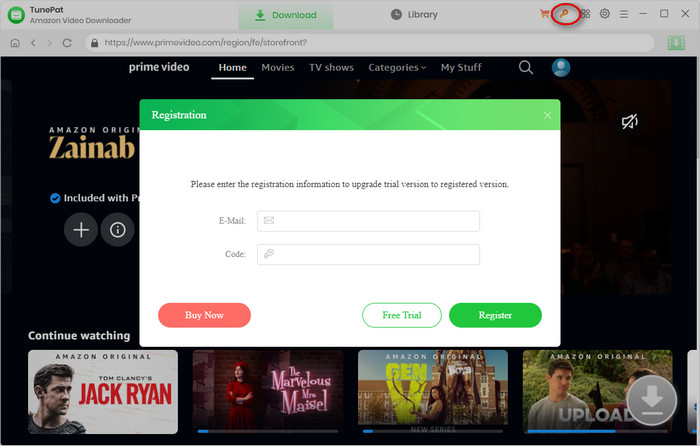
Register TunePat Amazon Video Downloader

  1. Make sure that the installed software matches the product and version you purchased - TunePat Amazon Video Downloader (Windows | Mac).
  2. Verify that the registration code you entered exactly matches the code provided in your purchase confirmation email. Check for any extra spaces or incorrect characters.
  3. Each registration code can be used on only one device at a time. If the code has already been activated on another device, sign out of or deactivate the previous device before trying to activate it on the current device.
  4. If the issue persists after trying the steps above, please contact our customer support team at support@tunepat.com for further assistance.

Please right-click the program icon and select "Run as administrator" from the context menu. Then click on the Menu icon icon on the upper right corner of the screen and click "Register" from the menu list, enter your registration email and code into the pop-up dialog window.

02. General Questions

TunePat Amazon Video Downloader is a professional video downloader that can download movies and TV shows in different video qualities from Amazon Prime Video, and all downloaded videos can be transferred to any device for offline viewing.

TunePat offers three subtitle encoding options to meet users' needs for playing video on different media players or devices.

  • The mode "External subtitles" will help you save subtitles as separate files.
  • "Internal subtitles" embeds the subtitles into the output video, allowing you to save multiple subtitle languages and switch between them while playing the video on supported players such as VLC Media Player.
  • If your media player or device does not provide subtitle options or support adding subtitles, "Hardcode subtitles" is a great option to help you burn the subtitles onto your video. But please note that you can save only one language in the video at a time.

TunePat supports hardware acceleration with Intel/NVIDIA/AMD graphics cards, which will enable you to run the program more smoothly and speed up the download process. To get the best performance, please make sure you have the latest graphics driver installed on your computer. Here is how to check and upgrade the graphics cards:

  1. Right-click the Windows "Start" menu, select "Device Manager", expand "Display adapters", then right-click your graphics card and select "Update driver".
  2. Sometimes driver upgrades might end in failure. No worries, you can also install the latest graphics driver from your graphics card manufacturer's website: Intel / NVIDIA / AMD (choose the exact one according to your computer). After upgrading your graphics driver, please reboot your computer to activate it.
03. Technical Support

If a conversion fails, try these troubleshooting steps first:

  1. Update or download the latest version. In TunePat, go to Menu > Check for updates, or download the latest version from the TunePat Download Page.
  2. Download files in smaller batches. Avoid processing too many files at once.
  3. Check your account status. Make sure you can sign in to your account successfully using an external web browser, and verify that your account has an active subscription. You can also try signing in to or out of your account in the program, then check whether the video can play normally within the program.
  4. Check your IP address and regional restrictions. If you are using a VPN, try disabling it or switching to a different VPN server.

If the problem persists, please contact us at support@tunepat.com or via Menu > Feedback. Please clearly describe the issue, the troubleshooting steps you have already tried, and the results. To help us investigate the problem more efficiently, please also provide the following information:
  • Screenshots or a screen recording showing the issue.
  • A link to the uploaded screen recording, if available.
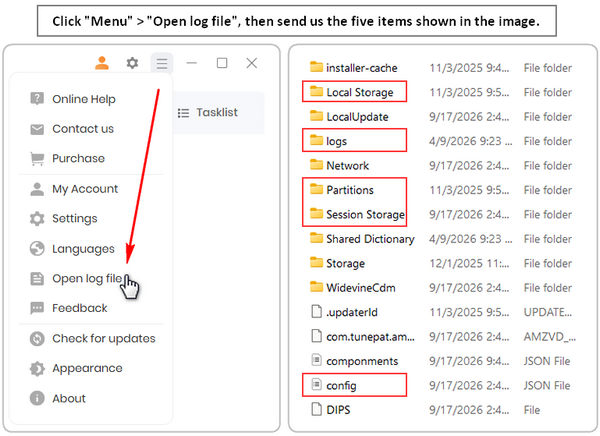
  • The TunePat log files and login cache, including the Local Storage, Partitions, Session Storage folders, and config.json file.
  • send log files and login cache
04. Refund Policy

TunePat offers a money-back guarantee within 5 days for annual plans and 30 days for the lifetime plan, effective from the date of purchase. For more details, please visit the Refund Policy.