How to Download Shows on Hulu for Offline Viewing
 By Izzy Warren
Hulu Video Tips
Updated on 9/24/2026
By Izzy Warren
Hulu Video Tips
Updated on 9/24/2026
Want to watch Hulu shows offline? Hulu provides a built-in download feature that allows eligible subscribers to save selected titles for offline playback. However, availability depends on your subscription plan, device, and content restrictions. In this guide, we'll explain how Hulu's official offline feature works, what you need before downloading, and how to save Hulu shows on Windows and Mac computers.

Contents
Part 1: Can You Download Shows on Hulu?
Yes, eligible Hulu subscribers can download select shows and movies for offline playback. However, these downloads are temporary and are only available on supported devices through the Hulu app. Hulu's official download feature also comes with several limitations, which we'll explain in the following sections.
Part 2: How to Download Shows on Hulu with the Hulu App
2.1 What You Need to Download Shows on Hulu
Before downloading Hulu shows for offline viewing, check that you have an eligible subscription, a supported device, and the latest Hulu app.
- A Hulu Subscription with Download Access: Hulu downloads are available only for certain subscription plans. Check your current plan details to confirm whether offline downloads are included.
- A Supported Device: Offline downloads are available only on supported mobile devices. A device that can stream Hulu does not necessarily support offline downloads.
- The Hulu App: Install the latest Hulu app on your supported device and sign in to your account before downloading.
2.2 Steps to Download Hulu Shows for Offline Viewing
Step 1 Launch the Hulu app on your supported mobile device and sign in to your account. Connect to Wi-Fi or enable cellular downloading if needed.
Step 2 Tap Downloads from the menu bar and select "See What's Downloadable" to browse available movies and shows. You can also use the search function to find a specific title.
Step 3 Open the title page and select the movie or TV episode you want to download. If the title supports offline downloads, tap the Download button to start the process.
Step 4 Wait for the download to complete. Download time depends on factors such as video size, device performance, and internet connection. Using Wi-Fi is recommended, especially when downloading multiple episodes.
Step 5 Once the download is complete, open Downloads from the menu bar to view your saved episodes or movies. You can then watch eligible downloads offline through the Hulu app.
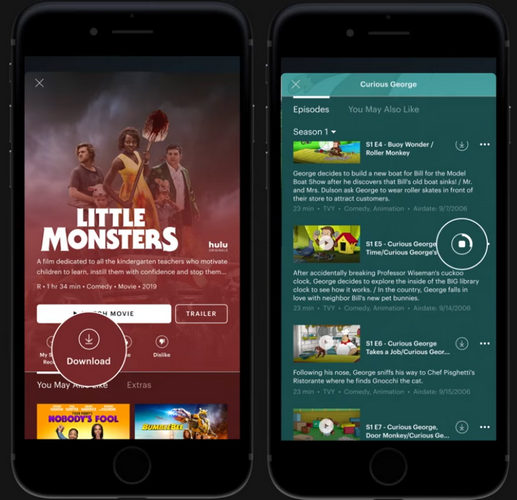
2.3 Hulu Download Limits You Should Know
Hulu downloads are designed for temporary offline viewing rather than permanent ownership. Here are the main limitations to keep in mind:
- Not all Hulu titles are downloadable: Only select shows and movies include a Download option. Some content, such as titles from Premium Add-ons and certain on-demand content available through Hulu + Live TV, cannot be downloaded for offline viewing.
- The number of downloads may be limited: Download limits depend on your subscription plan and Hulu's applicable restrictions. You can have up to 25 downloaded titles across five supported mobile devices at the same time. These limits apply to your Hulu account rather than individual profiles or devices.
- Downloads are temporary: Downloaded content is available for offline playback within Hulu and is not saved as a regular video file. Unwatched downloads are generally available for up to 30 days, unless the title becomes unavailable on Hulu earlier. After you start watching a downloaded title, you usually have 48 hours to finish playback before it expires.
- Downloaded videos remain subject to Hulu's service restrictions: You cannot manage downloaded content like ordinary local video files.
If you want to download Hulu shows on a Windows PC or Mac and have more flexibility for offline viewing, the official Hulu download feature may not meet your needs. In the next part, we'll look at another way to download Hulu shows on a computer.
Part 3: How to Download Hulu Shows on PC and Mac
If you primarily watch Hulu on a Windows PC or Mac, you may want a different way to save Hulu shows for offline viewing. Hulu's official download feature is designed around temporary downloads on certain compatible devices, while computer users may want a more flexible way to manage downloaded videos. TunePat Hulu Video Downloader is a desktop tool that allows users to download Hulu videos on Windows and Mac computers. With TunePat, you can download Hulu videos directly on your Windows PC or Mac and prepare them for offline viewing.

Step 1 Launch TunePat on your Windows or Mac computer. Select the Hulu icon from the initial interface and log in to your Hulu account when prompted (supports both ad-supported and ad-free plans).
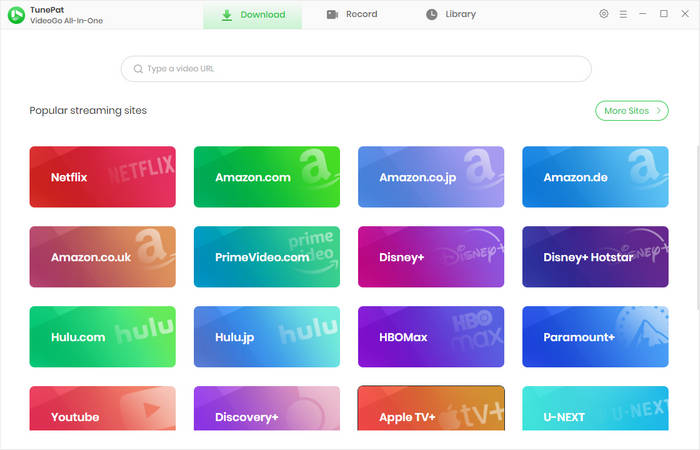
Step 2 Search for the shows you want to download. Open the video and click the green button in the bottom-right corner. Select the specific seasons and episodes you wish to download; if you need to customize output settings, such as format or video quality, adjust them in the pop-up window. Then, click "Download".

Step 3 TunePat will automatically begin downloading the videos. While the download is in progress, you can continue browsing Hulu or add more videos to the download queue. Once the download is complete, you can watch the Hulu videos offline on your computer.

Part 4: FAQs About Downloading Hulu Shows
Q1: Can I download Hulu shows on my laptop?
You can download select shows and movies for offline viewing through the Hulu mobile app. If you want to save Hulu videos to a Windows PC or Mac, Hulu does not currently provide the same official download option for computers. In this case, desktop download tools such as TunePat can provide another option for saving Hulu videos on a computer.
Q2: Can I download an entire season of a Hulu show?
It depends on the show and Hulu's download restrictions. Hulu only makes select content available for temporary download, and the number of downloads available can also be limited based on your Service Tier or the type of content. If multiple episodes are available for download, TunePat allows you to select multiple episodes and download them to your computer.
Q3: Can I watch downloaded Hulu shows without Internet?
Yes. Hulu's temporary download feature is specifically intended for offline viewing on supported devices. However, downloaded content remains subject to Hulu's applicable download and offline-viewing restrictions. With TunePat, you can also prepare Hulu videos on your PC or Mac for offline playback.
Q4: How long do Hulu downloads last?
There isn't one universal expiration period for every Hulu download. Hulu states that the length of time a temporary download remains available for offline viewing may vary depending on the Service Tier or type of content. If a download expires, you may need to reconnect to Hulu and download the content again, depending on the applicable rules. For the latest limits, check Hulu's Help Center for your specific plan and downloaded content.
Conclusion
Hulu's official download feature is suitable for eligible subscribers who want temporary offline viewing on supported mobile devices. If you want to download Hulu shows on a Windows PC or Mac, TunePat Hulu Video Downloader offers a convenient way to save them for offline playback with more control over the output. Download TunePat and start watching your favorite Hulu content offline on your computer.



Izzy Warren
Content Writer